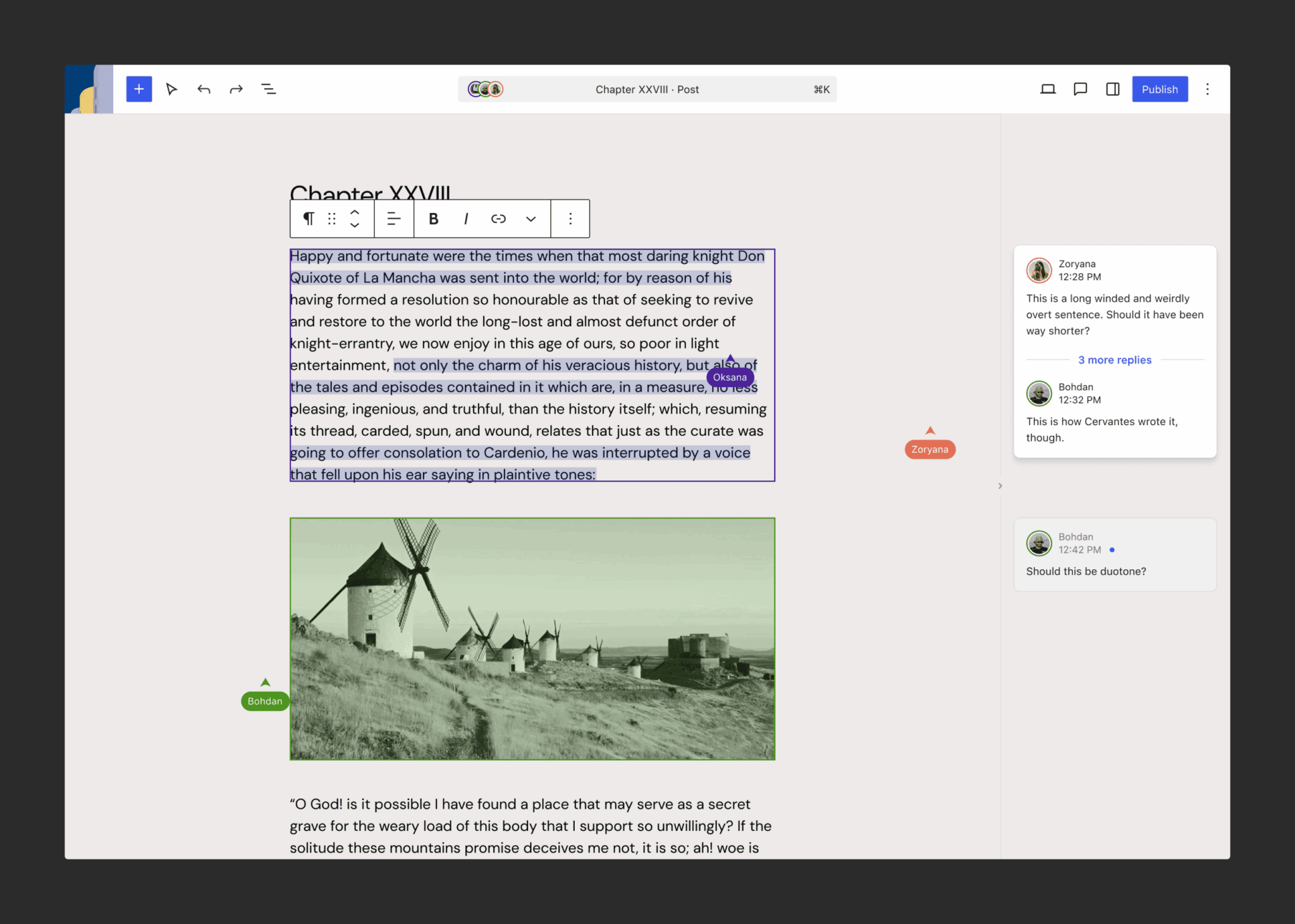
After last year’s update, this post seeks to summarize what’s been completed, what’s in progress, and how to follow along or contribute. This post also seeks to set expectations going forward and answer reoccurring questions at a high level. As a reminder Phase 3 is centered around fostering seamless collaboration, tying together the user experience, and streamlining the content management flows to improve the way creators and teams work together within WordPress. As work progresses, feedback is needed and welcomed to ensure broader adoption.

Real-time collaboration
Work is underway to expand the collaborative editing experiment, with the latest update highlighting key areas in progress:
- Performant and stable synchronization.
- Protections to make sure that the core Core is the set of software required to run WordPress. The Core Development Team builds WordPress.-data package retains control over which entity records are synced and how changes are merged.
- A filter Filters are one of the two types of Hooks https://codex.wordpress.org/Plugin_API/Hooks. They provide a way for functions to modify data of other functions. They are the counterpart to Actions. Unlike Actions, filters are meant to work in an isolated manner, and should never have side effects such as affecting global variables and output. to give plugins the ability to extend a SyncProvider class. This allows plugins to provide their own sync transports and to implement user-facing sync behaviors such as awareness / presence indicators.
- Stubs (lightweight placeholder records) that allow CRDT docs to be persisted in meta Meta is a term that refers to the inside workings of a group. For us, this is the team that works on internal WordPress sites like WordCamp Central and Make WordPress., avoiding the “initialization problem” as described by Kevin Jahns.
- A Yjs-powered UndoManager that works across multiple synced entities.
WordPress VIP has developed a working implementation demonstrating these capabilities A capability is permission to perform one or more types of task. Checking if a user has a capability is performed by the current_user_can function. Each user of a WordPress site might have some permissions but not others, depending on their role. For example, users who have the Author role usually have permission to edit their own posts (the “edit_posts” capability), but not permission to edit other users’ posts (the “edit_others_posts” capability)., and various contributors are working to bring functionality into Core via Gutenberg The Gutenberg project is the new Editor Interface for WordPress. The editor improves the process and experience of creating new content, making writing rich content much simpler. It uses ‘blocks’ to add richness rather than shortcodes, custom HTML etc. https://wordpress.org/gutenberg/. All of this work is being done to pave the way for possible inclusion in WordPress 7.0. For now, if you want to help test and give feedback, you can do so by using the latest Gutenberg plugin A plugin is a piece of software containing a group of functions that can be added to a WordPress website. They can extend functionality or add new features to your WordPress websites. WordPress plugins are written in the PHP programming language and integrate seamlessly with WordPress. These can be free in the WordPress.org Plugin Directory https://wordpress.org/plugins/ or can be cost-based plugin from a third-party and enabling the “Collaboration: add real-time editing” experiment in Gutenberg > Experiments. Keep in mind that a PR is not yet merged to remove the post lock modal but, until it is, you can still test having two sessions and see changes behind the modal itself.
Follow along in this dedicated GitHub issue and/or in the #feature-realtime-collaboration slack Slack is a Collaborative Group Chat Platform https://slack.com/. The WordPress community has its own Slack Channel at https://make.wordpress.org/chat/. channel.
Async collaboration: Notes
Formerly known as Block Block is the abstract term used to describe units of markup that, composed together, form the content or layout of a webpage using the WordPress editor. The idea combines concepts of what in the past may have achieved with shortcodes, custom HTML, and embed discovery into a single consistent API and user experience. Comments, the Notes feature is set to debut in WordPress 6.9, bringing block-level Notes to Core after first appearing in the Gutenberg plugin as an experimental feature in October of last year. With this initial release, you’ll be able to add/resolve/delete/thread notes on entire blocks but not yet on specific elements within a block. The name Notes was chosen to clearly distinguish it from WordPress’s existing comment functionality, making it easier to discuss and document the feature moving forward. It also provides flexibility for future expansions beyond block-level notes, without needing another rename. This was truly a collaborative effort to land this feature with various folks from across the community coming together from Fueled, Multidots, Automattic, GoDaddy, and Human Made contributing as well as individuals like Adam Silverstein and Aki Hamano.
Feedback as the feature lands in Core will help shape what’s next here so please help test and open issues. For now, initial future plans include compatibility with real time collaboration, the ability to leave notes on individual items within a block rather than just at the block level, and built-in notifications.
Follow along in this dedicated GitHub issue.
Admin (and super admin) redesign: DataView & DataForm
Early exploration centers on defining foundational primitives with DataView and DataForm components, building blocks that separate structure from presentation to support broad reusability across admin surfaces. Work has continued on both of these components to make them strong foundations that can handle more use cases with 154 commits done by ~37 different authors just for this latest release. For WordPress 6.9, this includes access to new field types, expanded filtering options, grouping support, views persistence, and improved configuration for custom dashboards and workflows. As a reminder, both of these components have been created with extensibility at the heart of everything being built. You can view each in their respective Storybook views: DataViews and DataForm. You can also read a more granular overview of what’s landed in this iteration issue for 6.9.
For now, if you want to help test and give feedback, you can do so by using the existing Pages, Templates, and Patterns screens in the Site Editor. For some of the more experimental aspects, you can help test by using the latest Gutenberg plugin and enabling from the Gutenberg > Experiments page the following different experiments:
- Data Views: add Quick Edit – this adds a Quick Edit panel in the Site Editor Pages experience.
- Data Views: enable for Posts – this adds a redesigned Posts dashboard accessible through a submenu item in the Gutenberg plugin so you can still have access to your current Posts experience.
Below is a demo of this last experiment that enables Data Views for Posts. It also showcases a feature of WordPress 6.9 with data views options now persisting across sessions, until you hit reset view.
Follow along in this dedicated Admin Materials and Surfaces issue.

Leave a Reply