And this is particularly irritating when you test all URLs and they all work, yet checklist flags as not valid, there needs to be an override button. At this point we have to disable the plugin in order to publish. Not a great solution
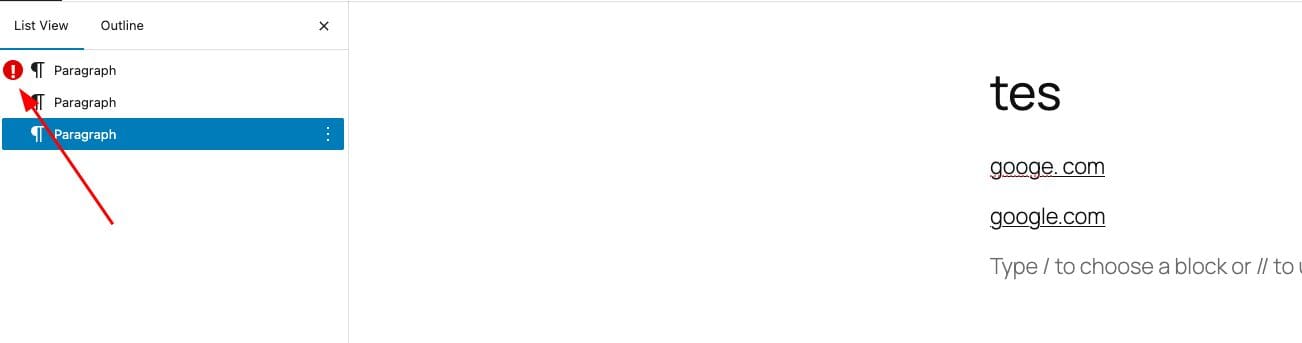
Yes, we have exactly that feature. If you check on the list panel, you will see red notice like this:

Can you please check again?
OK so checked and didnt get the red marks. Checklist is showing invalid link on the right side but nothing on the left

Here finally is the screenshot
To make matters worse, I opened every link and they all opened the intended page properly. There really needs to be an override option
Its on auto-update
With PublishPress Checklists, you can choose publishing requirements for your content.
Version 2.26.0
And then there is the problem of blocking valid URL as invalid. If you click on the link and it open that cant be invalid
And then there is the problem of blocking valid URL as invalid
Can you inform us what URL is that? We will try to replicate it from our end.
For the red notice, can you please try basic troubleshooting like deactivate all plugins except PublishPress Checklists to see if the red notice showing? I could see the notice just fine here.
Hi @sagesteppewild,
We haven’t heard back from you in two weeks. Let me mark this as resolved. You do not need to worry about it. You can always reply to this message or create a new one if you would like to continue the discussion.
OK ran into the problem again.
Shut off all plugins but yours and still no red check
So its not a plugin conflict
I also clicked on every single link and all were valid

Leave a Reply