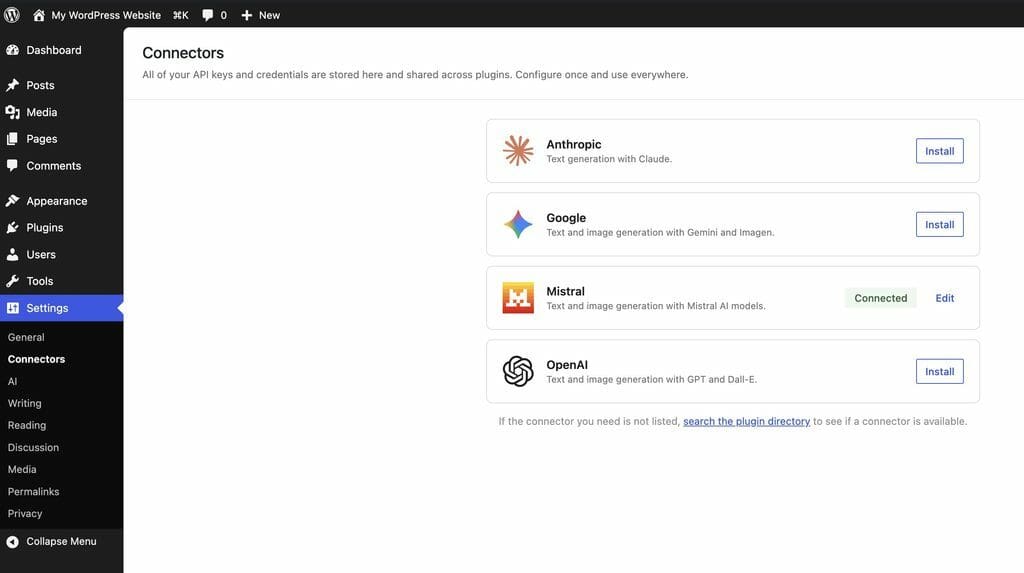
The WordPress AI Team is excited to invite the community to test a growing collection of community-built AI connector plugins. These plugins extend WordPress by connecting it to additional AI services through the PHP AI Client — the provider-agnostic Software design that works with multiple service providers without being tied to one. Recommended for WordPress AI integrations. SDK that is part of the upcoming WordPress 7.0 release (read more about it here).
WordPress 7.0 will ship with the PHP PHP (recursive acronym for PHP: Hypertext Preprocessor) is a widely-used open source general-purpose scripting language that is especially suited for web development and can be embedded into HTML. https://www.php.net/manual/en/preface.php AI Client baked into core Core is the set of software required to run WordPress. The Core Development Team builds WordPress., and connectors for Anthropic, Google, and OpenAI appear as default options in the connector screen — ready to install with a single click. But the real power of the PHP AI Client’s open architecture is that anyone can build a connector for any AI service. The community has already stepped up — and these plugins are ready for testing.
If you’ve been curious about WordPress’s evolving AI capabilities, this is a great opportunity to try them out firsthand and help shape the experience.
What are AI connector plugins?
AI connector plugins act as bridges between WordPress and external AI services. They implement the PHP AI Client’s provider An AI service offering models for generation, embeddings, or other capabilities (e.g., Anthropic, Google, OpenAI). interface, allowing any WordPress plugin A plugin is a piece of software containing a group of functions that can be added to a WordPress website. They can extend functionality or add new features to your WordPress websites. WordPress plugins are written in the PHP programming language and integrate seamlessly with WordPress. These can be free in the WordPress.org Plugin Directory https://wordpress.org/plugins/ or can be cost-based plugin from a third-party. or theme to use AI capabilities — text generation, image generation, function calling, and more — through a unified, provider-agnostic API An API or Application Programming Interface is a software intermediary that allows programs to interact with each other and share data in limited, clearly defined ways..
Connectors for Anthropic, Google, and OpenAI are featured prominently in the WordPress 7.0 connector screen and can be installed directly from there. The community connector plugins featured in this article expand the ecosystem further, giving users and developers more choice in which AI services power their WordPress sites.
Each connector plugin handles the specifics of communicating with its respective AI service, so developers and users can switch between providers without changing their code or workflow.

Community connector plugins to test
AI Provider for Grok (xAI)
Grok is xAI’s conversational AI, known for its real-time knowledge and distinctive personality.
- Author: Aslam Doctor
- Repository: GitHub · WordPress.org
- Version: 1.0.2
- Capabilities: Text generation, function calling, vision input, structured output, multi-candidate generation, chat history
- Models: Dynamically discovered from the xAI API, including vision-capable models
- API key: Purchase API tokens from x.ai and configure under Settings > AI Credentials or via the
GROK_API_KEYenvironment variable - Install: Install from WordPress.org or download from GitHub Releases
AI Provider for Mistral
Mistral AI is a European AI company offering powerful open and commercial models for text and image generation.
- Author: Lauri Saarni
- Repository: GitHub · WordPress.org
- Version: 1.1.0
- Capabilities: Text generation, image generation, function calling, vision input, structured output (JSON JSON, or JavaScript Object Notation, is a minimal, readable format for structuring data. It is used primarily to transmit data between a server and web application, as an alternative to XML. schema)
- Models: Dynamically discovered from the Mistral API — always up to date with the latest available models, including
mistral-medium-2505for image generation - API key: Obtain from Mistral Console
- Install: Install from WordPress.org or download from GitHub Releases
AI Provider for Ollama
Ollama lets you run open-source AI models locally on your own hardware — no API key, no cloud, no cost. Perfect for privacy-conscious sites and local development.
- Author: Fueled
- Repository: GitHub · WordPress.org
- Capabilities: Text generation using locally hosted models, automatic model detection, support for both local and Ollama Cloud deployments
- Models: Any model available through Ollama’s registry (Llama 3.2, Mistral, Phi, Gemma, and more)
- API key: No API key required for local mode — just have Ollama running on your machine. Cloud mode requires an Ollama Cloud API key.
- Install: Install from WordPress.org or download from GitHub. For local mode, install Ollama and pull a model (e.g.,
ollama pull llama3.2).
AI Provider for OpenRouter
OpenRouter is a unified API gateway providing access to 400+ AI models from dozens of providers — including Anthropic, OpenAI, Meta Meta is a term that refers to the inside workings of a group. For us, this is the team that works on internal WordPress sites like WordCamp Central and Make WordPress., Google, Mistral, and many more — through a single API key.
- Author: Jonathan Bossenger
- Repository: GitHub · WordPress.org
- Capabilities: Text generation with access to 400+ models, searchable model selection with provider filtering, free-tier model toggle, context length and pricing display
- Models: Full OpenRouter catalog — Claude, GPT-4, Llama 3, Gemini, Mistral, and hundreds more
- API key: Create an account at openrouter.ai and retrieve your key from Settings > Keys. Configure under Settings > OpenRouter AI in the WordPress admin.
- Install: Install from WordPress.org
Testing environment
We encourage testers to use WordPress 7.0 which includes the PHP AI Client as part of core. This is the closest you can get to the final WordPress 7.0 experience and helps us catch integration issues before the stable release.
You will also need the AI Experiments plugin, which provides the user-facing features that leverage the AI capabilities these connectors provide.
Prerequisites
- WordPress 7.0 (Beta Tester Plugin recommended ahead of the final 7.0 release)
- PHP 7.4 or higher (PHP 8.0+ for OpenRouter and Ollama)
- AI Experiments plugin installed and activated
- An API key for at least one of the AI providers listed above (not required for Ollama in local mode)
Setup steps
- Install WordPress 7.0.
- Install and activate the AI Experiments plugin.
- Install and activate one or more community connector plugins from the list above.
- Navigate to the connector settings in your WordPress dashboard to verify the provider appears and is available.
What to test
1. Provider setup and connectivity
- Does the connector plugin activate without errors?
- Does the provider appear in the connector selection screen alongside the default providers (Anthropic, Google, OpenAI)?
- Is the API key configuration straightforward?
- Does the availability check succeed when the API key is valid?
2. Text generation
- Enable AI experiments in the AI settings.
- Open the post editor and and use text generation fetures. Do AI-powered suggestions appear?
- Try switching between community connectors and the default providers — does the experience remain consistent?

3. Image generation
For connectors that support image generation (currently Mistral):
- Can you generate images using “Generate featured image A featured image is the main image used on your blog archive page and is pulled when the post or page is shared on social media. The image can be used to display in widget areas on your site or in a summary list of posts.”- feature in the editor?
- How does the generation speed compare to the default providers?
4. Error handling
- What happens when an invalid API key is provided?
- For Ollama: what happens when the local Ollama service is not running?
- Are error messages clear and actionable?
Known issues
- Image generation is currently only available on select providers and models.
Questions to consider
When testing, we’d appreciate your thoughts on:
- Setup experience: Was the installation and configuration process clear? What could be improved?
- Provider switching: Did switching between community connectors and default providers feel seamless?
- Response quality: How did the AI responses compare across different community providers and the defaults?
- Performance: Did you notice latency or performance differences between providers?
- Local AI (Ollama): If you tested local models, how did the experience compare to cloud providers? Was setup straightforward?
- Error messages: When something went wrong, were the error messages helpful?
- Documentation: Was there enough information to get started? What was missing?
How to give feedback
Testing timeline
Testing is open from 25 March 2026 through 2 April 2026 8 April 2026.
Want to build your own connector?
The PHP AI Client makes it straightforward to build a connector for any AI service. If your preferred AI provider isn’t listed above, consider building one! The PHP AI Client documentation and the community connector plugins listed here are great starting points. At a high level, connector plugins need to:
- Extend
AbstractApiProviderfrom the PHP AI Client. - Implement model metadata discovery and model classes for supported capabilities.
- Register the provider with
AiClient::defaultRegistry()on the WordPressinithook.
We welcome new community connectors and would love to include them in future testing rounds.
Thank you for helping test and improve WordPress’s AI capabilities. The more providers the community builds and tests, the more choice WordPress users will have when AI features land in WordPress 7.0.
Props to @aslamdoctor, @fueled, @laurisaarni and @psykro for their contributions to the WordPress AI connector ecosystem.
Thanks to @jeffpaul for reviewing the article.

Leave a Reply