WordPress build tooling is about to change. But not in a disruptive way. Most developers who use @wordpress/scripts today will not need to change anything when the transition happens. But the underlying engine, the philosophy, and the developer experience are all shifting, and the window to influence that direction is open right now.
@wordpress/build is the tool driving that shift. It replaces the webpack and Babel pipeline with a significantly faster build engine, auto-generates PHP registration files from package.json conventions, and handles scripts, script modules, and styles in one pass. It works through convention-based folder discovery: a packages/ directory for JavaScript packages and a routes/ directory for admin page routes, each auto-discovered with no configuration. Gutenberg already uses it to build all of its 100+ packages. The long-term plan is for it to become the engine underneath @wordpress/scripts, so every plugin developer benefits from the same tooling, without changing their workflow.
@wordpress/build is not ready for every use case yet. In particular, a plugin registering blocks, a common entry point for WordPress plugin developers, still has gaps that require manual workarounds. But as Riad Benguella noted when introducing the vision:
“I can’t find edge cases by only working on Gutenberg.”
This article explains what @wordpress/build does, how it works inside Gutenberg today, what it means for plugin developers, and, crucially, where the project needs your feedback while the API is still being shaped.
The vision
@wordpress/scripts has served plugin developers well since the block editor launched. It preconfigures webpack, handles dependency extraction via @wordpress/dependency-extraction-webpack-plugin, and generates .asset.php files. But it accumulated complexity over the years: custom Babel plugins, flexible (and therefore complex) webpack configurations. And it has a telling limitation: Gutenberg itself never used it to build its own packages. Core relied on separate custom tooling.
In October 2025, Riad Benguella opened issue #72032 “WordPress Scripts: A vision for a v2 version”:
What if instead of flexibility, we absorb complexity into the tool to make plugin development as easy as it should have been? You want a new block, just add a “blocks” folder with a list of blocks. You want a new page in wp-admin, just add a folder with an index file for that page. But the build command is always the same —
wp-scripts build, no arguments, nothing.
The proposal: replace configuration with convention. Place your code in known folders, packages/ for JavaScript packages or routes/ for admin pages, declare what each package is through package.json fields, and run a single wp-build command that discovers everything and figures out the rest. No webpack config, no entry point lists, no Babel pipeline. And critically: PHP registration generated automatically, not written by hand.
PR #72743 introduced @wordpress/build as a standalone package in October 2025, and it became Gutenberg’s internal build tool. The next step is making it work for everyone.
A faster and simpler build process
The JavaScript ecosystem has moved well beyond the webpack and Babel era. Native-speed bundlers (tools written in Go, Rust, and other compiled languages) can parse, transpile, and bundle in a fraction of the time, often by handling everything in a single pass rather than through a multi-tool pipeline.
@wordpress/build takes advantage of this. Its current internal engine is esbuild, a Go-based bundler that replaces the separate webpack bundling and Babel transpilation steps. For a large project like Gutenberg (100+ packages), full builds that took minutes now take seconds. In watch mode, wp-build --watch uses incremental rebuilds, and only the changed package and its dependents are recompiled, making the feedback loop near-instant.
The use of esbuild as a bundler is an internal implementation detail: not exposed in the API, and subject to change without any impact on how you use the tool.
Speed is part of the picture, but it does not explain why @wordpress/build requires almost no configuration. That comes from the tool’s opinionated nature. @wordpress/scripts accumulated complexity not because of webpack, but because of the choice to keep it as a thin, flexible wrapper — one that you can customize for your needs. @wordpress/build makes the opposite bet: absorb the complexity into the tool and provide a set of conventions for common cases.
How it works
@wordpress/build uses a convention-based discovery model. Place your code in known top-level folders and the tool finds it automatically:
packages/— JavaScript packages. Each subdirectory is a package with its ownpackage.json. The tool scanspackages/*/package.jsonto discover what to build.routes/(experimental) — Admin page routes. Each subdirectory defines a route with apackage.jsonmapping it to a page and URL path. Components and lifecycle hooks are bundled automatically. Requires pages to be declared inwpPlugin.pagesin the rootpackage.json.
A blocks/ folder following the same pattern is proposed in issue #74542 (see Block plugin structure and registration below).
No separate build config file is needed. Discovery is driven by folder structure; a small set of package.json fields handles the rest.
packages/, routes/, blocks/ cannot be renamed or pointed elsewhere via config or CLI flags. If your project already uses these directory names for other purposes, you’ll need to restructure before adopting the tool. This is a known constraint and worth raising if it affects your workflow.
Configuration
Custom settings that can’t be inferred from the folder structure live at two levels:
- Root
package.json(plugin level) — plugin-wide settings: the namespace, the global variable name, the handle prefix, and any external namespaces from other plugins. This is thewpPluginblock. - Unit
package.json(one per discovered unit, insidepackages/,routes/(experimental), or similar) — per-unit settings: whether it registers as a script (wpScript) or a script module (wpScriptModuleExports). Packages that need Web Workers usewpWorkersto define self-contained worker bundles, which are compiled with all dependencies inlined and loadable via Blob URLs.
Here is Gutenberg’s root configuration:
{
  "wpPlugin": {
    "name": "gutenberg",
    "scriptGlobal": "wp",
    "packageNamespace": "wordpress",
    "handlePrefix": "wp"
  }
}
And a package-level configuration for a simple utility package:
{
  "name": "@wordpress/api-fetch",
  "wpScript": true,
  "wpScriptModuleExports": {
    ".": "./build-module/index.mjs"
  }
}
Two fields replace what would otherwise be webpack config, Babel plugins, and hand-written PHP:
Auto-generated PHP registration
@wordpress/build generates the WordPress registration layer for scripts, modules, and styles. A single line in your plugin file:
require_once plugin_dir_path( __FILE__ ) . 'build/build.php';This loads scripts.php, modules.php, and styles.php ,generated files that hook into wp_default_scripts and wp_default_styles to register every script, module, and style your packages produce. The .asset.php files track dependencies automatically from your imports, including the distinction between static and dynamic module imports that WordPress uses to optimize the import map.
The namespace model
If you have used @wordpress/scripts, you are familiar with how @wordpress/dependency-extraction-webpack-plugin externalizes @wordpress/* imports: import { __ } from '@wordpress/i18n' becomes a reference to window.wp.i18n at runtime rather than bundling the package (see How webpack and WordPress packages interact). @wordpress/build bakes this in and extends it.
Your wpPlugin namespace configuration determines how your own packages are externalized. A package named @acme/editor with wpScript: true is bundled as an IIFE at window.acme.editor with handle acme-editor. When another package in your plugin imports from @acme/editor, that import is automatically externalized: the bundle references the global instead of duplicating the module, and acme-editor is declared in the .asset.php dependencies.
The same model works across plugins. Declare another plugin’s namespace as external:
{
  "wpPlugin": {
    "externalNamespaces": {
      "woo": { "global": "woo", "handlePrefix": "woocommerce" }
    }
  }
}
Now import { Cart } from '@woo/cart' resolves to window.woo.cart at runtime, and woocommerce-cart appears automatically in your .asset.php dependencies so WordPress loads WooCommerce’s script before yours without any manual dependency declaration.
Who should engage with it today
Gutenberg contributors. When you run npm start in the Gutenberg repository, @wordpress/build is what executes. Understanding the wpPlugin config, the wpCopyFiles transforms, and the externals resolution helps you debug build issues and understand how Gutenberg ships code to WordPress core.
Developers building plugins with multiple scripts or packages. @wordpress/build is not limited to monorepos. Each JavaScript entry point can be its own package: just add "private": true to its package.json and place it under packages/. This means the tool is viable for most plugin architectures, not just those structured as multi-package npm workspaces. If your plugin has multiple scripts, modules, or admin pages that currently require separate webpack entry points or hand-written PHP registration, the convention-based model is worth evaluating.
Developers who want to help shape the tool. The API is malleable right now. If you care about how WordPress build tooling works, this is the moment to engage. Try the tool, hit the rough edges, file what you find.
Everyone else: stay on @wordpress/scripts. For single-block plugins, @wordpress/create-block gives you a working block in one command. For plugins maintaining a stable webpack setup, the convergence with @wordpress/scripts will bring the benefits without requiring migration. For most developers, waiting for that convergence is the lower-friction path, though if your plugin’s needs align with the current conventions, migrating earlier is a legitimate option.
These are the areas where the design is unresolved and your experience can directly shape the outcome.
Block plugin structure and registration
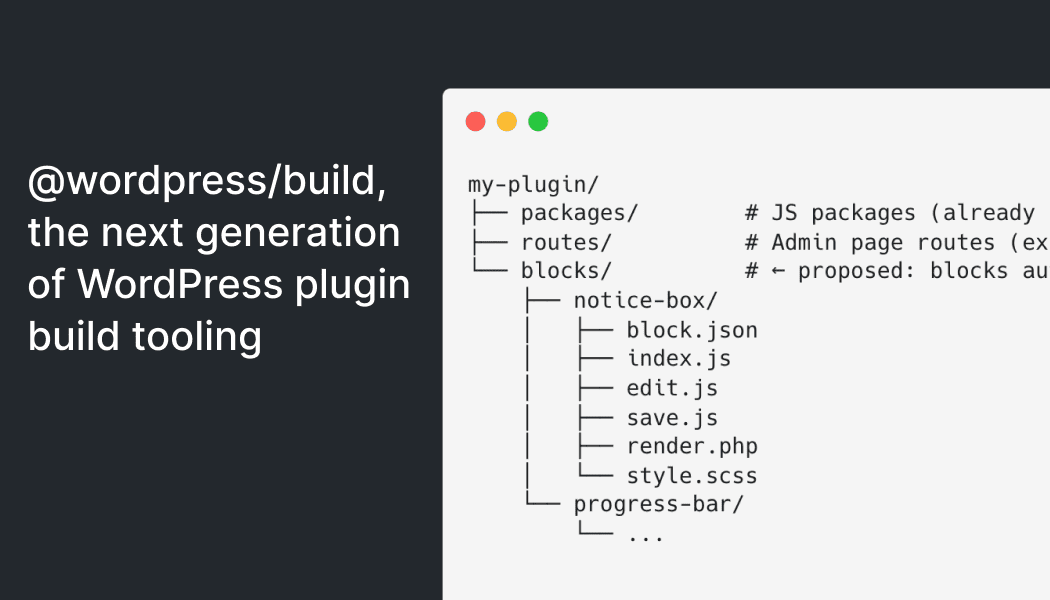
@wordpress/build already supports an experimental routes/ folder at the project root. Place it alongside packages/, declare your pages in wpPlugin.pages in the root package.json, and each route maps itself to a declared page via a route.page field in its own package.json. Issue #74542 proposes the same auto-discovery pattern for blocks:
my-plugin/
├── packages/ # JS packages (already supported)
├── routes/ # Admin page routes (experimental, already supported)
└── blocks/ # proposed: blocks auto-discovered here
├── notice-box/
│ ├── block.json
│ ├── index.js
│ ├── edit.js
│ ├── save.js
│ ├── render.php
│ └── style.scss
└── progress-bar/
└── ...Drop a folder in blocks/, run wp-build, and get a generated build/blocks.php that handles all registration: no wpCopyFiles configuration, no manual PHP loader, no style registration boilerplate. The proposal also targets making this the default for @wordpress/create-block, replacing @wordpress/scripts as the scaffolding target.
The question for block plugin developers: does this structure work for how you build plugins today? Is a blocks/ folder at the root the right convention, or do you need something different? The issue has eight comments but needs broader input from developers outside the Gutenberg team. If block development is your primary use case, #74542 is the most valuable place to contribute.
Also related, the issue #75832 covers whether the manifest should register blocks with WP_Block_Metadata_Registry (the wp_register_block_types_from_metadata_collection() approach introduced in WordPress 6.8, see the WordPress 6.8 dev note).
The setup experience outside a monorepo
Setting up @wordpress/build in a standalone plugin currently requires: npm workspaces (for cross-package import resolution), @wordpress/* packages physically installed (the externals plugin reads their metadata), and @babel/core as a hidden dependency when @wordpress/components is in your tree. None of this is documented.
Try the tool. Every friction point you report helps bridge the gap between “works for Gutenberg” and “works for everyone.”
The externals and namespace model
The build reads installed @wordpress/* package metadata to decide how to externalize each import: as a classic script global or a script module. This model also enables cross-plugin interoperability via externalNamespaces. Does it cover your plugin architecture? Are there dependency patterns it does not support?
Issue #75196 — Build: Update tools to recognize module dependencies of scripts was opened around this topic.
The convergence roadmap
@wordpress/build is designed to become the engine underneath @wordpress/script, not to replace it externally, but to power it from within:
- Today: standalone package, used internally by Gutenberg. Third-party adoption requires working around some of the gaps described above.
- Next:
@wordpress/scriptsadopts@wordpress/buildas its build engine.wp-scripts buildcontinues to work; transpilation and bundling shift to use wp-build internally. - Eventually: webpack and Babel are deprecated from
@wordpress/scripts. Developers using the default setup see faster builds and auto-generated PHP registration. Developers with custom webpack configs get a migration guide.
The features in @wordpress/build today, PHP transforms, script module support with static/dynamic tracking and RTL generation, will reach every wp-scripts build user through this path. How smooth that transition is depends on how much the rough edges get filed before the API stabilises.
Track the vision in issue #72032. If you work with WordPress build tooling, now is the time to engage.
Resources
Props to @youknowriad, @greenshady and @welcher for reviewing this post

Leave a Reply