One of the most common complaints from Contributor Day Contributor Days are standalone days, frequently held before or after WordCamps but they can also happen at any time. They are events where people get together to work on various areas of https://make.wordpress.org/ There are many teams that people can participate in, each with a different focus. https://2017.us.wordcamp.org/contributor-day/ https://make.wordpress.org/support/handbook/getting-started/getting-started-at-a-contributor-day/ facilitators is this: participants spend the entire session trying to set up their local environment and never get to actually contribute.
Before writing a single line of code, a first-time WordPress core Core is the set of software required to run WordPress. The Core Development Team builds WordPress. contributor typically needs to install Git Git is a free and open source distributed version control system designed to handle everything from small to very large projects with speed and efficiency. Git is easy to learn and has a tiny footprint with lightning fast performance. Most modern plugin and theme development is being done with this version control system. https://git-scm.com/, Node.js, npm, Docker, configure everything correctly, and troubleshoot whatever breaks along the way. At in-person events, this alone can take hours — sometimes the full day.
The WordPress Core Dev Environment Toolkit aims to eliminate this friction entirely.
What is it?
The WordPress Core Dev Environment Toolkit is a desktop application (available for macOS, Windows, and Linux) that sets up a full WordPress core development environment with zero prerequisites.
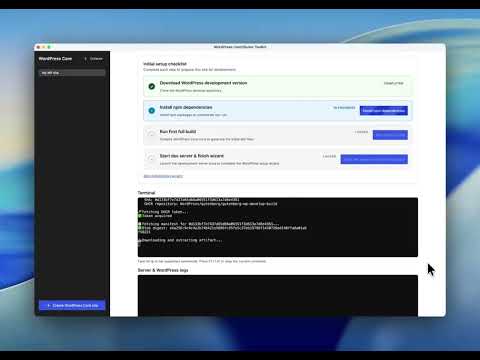
You install it, choose a directory for wordpress-develop, click a button, and you have:
- A cloned
wordpress-developrepository - A running WordPress dev server
- The ability to make code changes and generate a patch A special text file that describes changes to code, by identifying the files and lines which are added, removed, and altered. It may also be referred to as a diff. A patch can be applied to a codebase for testing.
No Git, no Node.js, no npm, no Docker needed. Everything is bundled inside the application as JS JavaScript, a web scripting language typically executed in the browser. Often used for advanced user interfaces and behaviors./WASM, powered by WordPress Playground.
What does it do?
Once installed, the app lets you:
- Clone
wordpress-developinto a directory of your choice - Run
npm install,npm run build, andnpm run devautomatically - Start a WordPress dev server using Playground’s CLI Command Line Interface. Terminal (Bash) in Mac, Command Prompt in Windows, or WP-CLI for WordPress.
- Make changes to core files directly
- Generate a patch from your changes, ready to attach to a Trac An open source project by Edgewall Software that serves as a bug tracker and project management tool for WordPress. ticket Created for both bug reports and feature development on the bug tracker.
The entire toolchain — npm, Node, Git — runs as JavaScript JavaScript or JS is an object-oriented computer programming language commonly used to create interactive effects within web browsers. WordPress makes extensive use of JS for a better user experience. While PHP is executed on the server, JS executes within a user’s browser. https://www.javascript.com/WASM bundled with the app. There’s no terminal work required for the basic contributor workflow.
Here’s the full setup flow — from a fresh install to a running WordPress development environment:
Once your environment is running, generating a patch to submit to Trac takes just a few clicks:
Why this matters for Contributor Days
Environment setup has historically been one of the biggest drop-off points during Contributor Days. When participants can’t get set up in time, the session is over before it starts — regardless of their interest or motivation.
This tool makes it realistic to go from attendee to first patch in a single afternoon. It’s designed specifically for the Contributor Day context: fast setup, no prerequisites, no troubleshooting.
How to use it at your next Contributor Day
If you’re organizing or facilitating a core table at a WordCamp WordCamps are casual, locally-organized conferences covering everything related to WordPress. They’re one of the places where the WordPress community comes together to teach one another what they’ve learned throughout the year and share the joy. Learn more.:
- Share the download link with participants ahead of the event so they can install it at home on good WiFi (the app is a larger download).
- Walk through the setup at the start of the session: install, click to set up the environment, make a small change, generate a patch.
- Point participants to the Core Contributor Handbook for guidance on what to contribute and how once they’re set up.
Download and feedback
- GitHub GitHub is a website that offers online implementation of git repositories that can easily be shared, copied and modified by other developers. Public repositories are free to host, private repositories require a paid subscription. GitHub introduced the concept of the ‘pull request’ where code changes done in branches by contributors can be reviewed and discussed before being merged by the repository owner. https://github.com/ repository and releases: https://github.com/WordPress/experimental-wp-dev-env
- The tool is experimental and under active development. Feedback is welcome via GitHub issues.
If you use this tool at a Contributor Day, please share how it went — either in the comments below or in the #core channel on Slack Slack is a Collaborative Group Chat Platform https://slack.com/. The WordPress community has its own Slack Channel at https://make.wordpress.org/chat/. Reports from the field help prioritize improvements.
Props to @greenshady @desrosj @audrasjb for review
+make.wordpress.org/playground/ +make.wordpress.org/test/ +make.wordpress.org/community/

Leave a Reply